Create iCloud Account is simple once you know the steps. Your iCloud account connects all Apple devices, keeps your data safe, and helps you access apps, photos, and files from anywhere. Whether you are new to Apple or want to set up accounts for family members, this guide will show you everything you need to know.
We’ll explain how to create iCloud account, create iCloud account for a child, and even create iCloud account without phone number. By the end, you’ll have your iCloud account ready in minutes, with tips to make it secure and easy to use.
What is an iCloud Account?
An iCloud account is your personal Apple account that links your iPhone, iPad, Mac, or even Windows PC. With it, you can back up photos, contacts, notes, and app data. iCloud also allows sharing documents, calendar events, and more across all your Apple devices.
Think of it as a digital locker that keeps all your Apple data safe. Without an iCloud account, you won’t be able to use Apple services fully. That’s why knowing how to create iCloud account is essential for anyone using Apple devices.
How to Create iCloud Account on iPhone
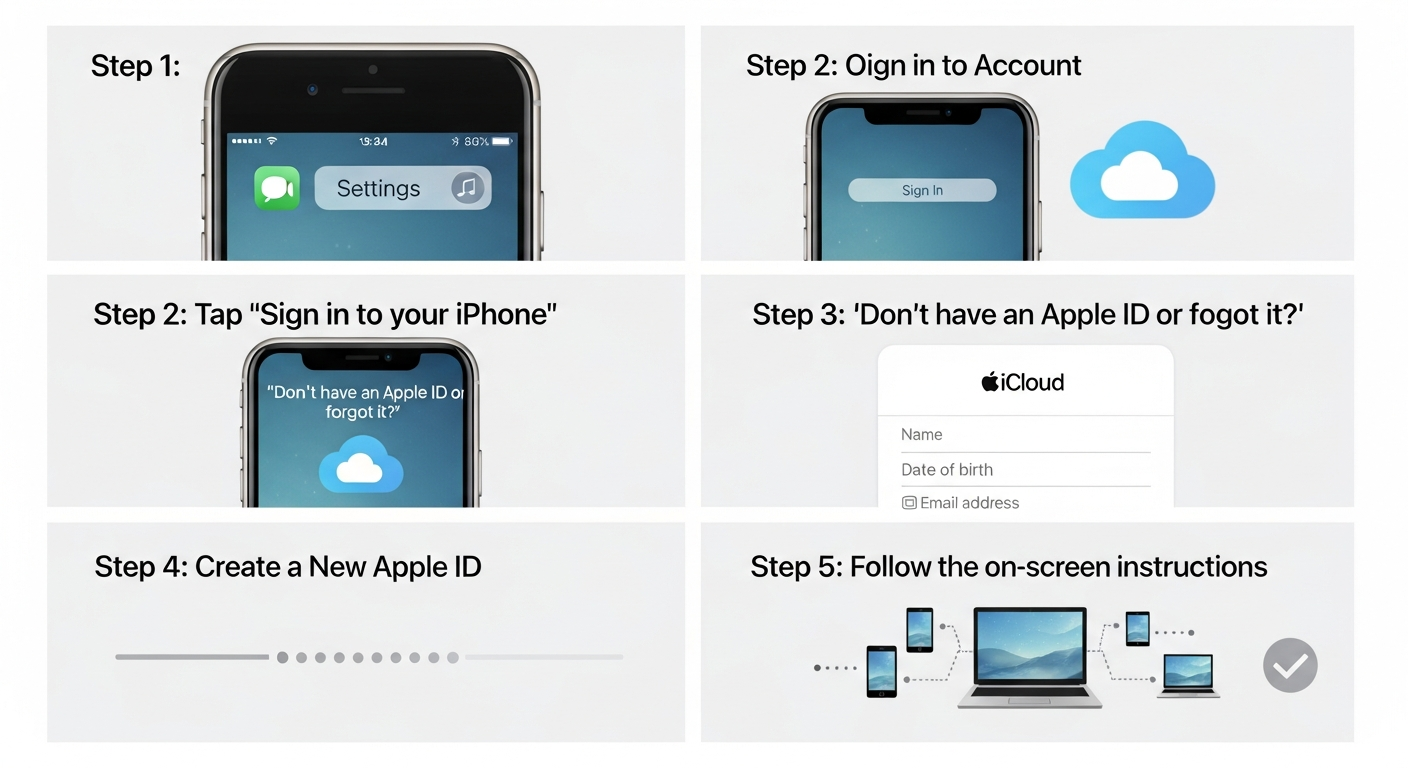
- Open Settings on your iPhone.
- Tap Sign in to your iPhone.
- Select Don’t have an Apple ID?
- Choose Create Apple ID.
- Fill in your name, birthday, and email.
- Create a strong password and verify it.
- Add your phone number for security.
- Agree to terms and conditions.
Within a few minutes, your iCloud account will be ready. You can now access iCloud Drive, Apple Music, App Store, and more.
How to Create iCloud Account on Mac
- Click the Apple menu → System Settings → Sign in.
- Select Create Apple ID.
- Fill in your name, birthday, and email.
- Set a password and security questions.
- Verify your email address and phone number.
Your iCloud account will sync across all Apple devices, keeping your files, apps, and photos organized automatically.
Create iCloud Account for Child
Apple allows you to create an iCloud account specifically for kids. These accounts give parental control, screen time limits, and age-appropriate access.
- Open Settings → Family Sharing → Add Family Member.
- Select Create a Child Account.
- Enter the child’s name and birthdate.
- Set up an Apple ID for your child.
- Enable parental controls and verify with your own account.
This helps children safely enjoy Apple devices while parents monitor usage.
iCloud Account Features Table
| Icon | Feature | Description | Benefit |
|---|---|---|---|
 |
Account Type | Apple ID connected to iCloud | Access Apple services & devices |
|
Devices Supported | iPhone, iPad, Mac, Windows | Sync data across all devices |
|
Backup | Photos, Files, App Data | Keep data safe & secure |
|
Security | Two-factor authentication | Prevents unauthorized access |
|
Family Sharing | Share apps, music, and storage | Up to 6 family members |
|
Storage | 5GB free, paid upgrades available | Expandable storage as needed |
|
Account Recovery | Email or security questions | Restore lost accounts quickly |
Create iCloud Account Without Phone Number
You can create an iCloud account without a phone number using an email instead.
- Start creating a new Apple ID.
- When asked for a phone number, select Use Email Instead.
- Verify your email address with the code Apple sends.
- Complete account creation.
This method is useful if you don’t want to link your number or are creating accounts for kids or secondary devices.
Benefits of Having an iCloud Account
- Automatic Backup: Never lose your photos or files.
- Device Syncing: Access data across iPhone, iPad, and Mac.
- Secure Storage: Protects your personal data with Apple encryption.
- Family Sharing: Share apps, music, and storage with family members.
- Find My Device: Locate lost Apple devices instantly.
An iCloud account makes Apple devices more than just gadgets—they become connected tools for daily life.
Tips for Creating a Strong iCloud Account
- Use a strong password with letters, numbers, and symbols.
- Enable two-factor authentication for extra security.
- Keep your recovery email and security questions updated.
- Avoid using the same password for other accounts.
These tips keep your iCloud account safe from hacks and unauthorized access.
Troubleshooting Common iCloud Account Issues
- Forgot Password: Reset through Apple’s account recovery page.
- Email Not Verified: Check spam folders for verification emails.
- Device Not Syncing: Ensure iCloud is enabled in settings.
Following these steps usually resolves most iCloud-related issues without contacting support.
(FAQs)
Q1: Can I create multiple iCloud accounts?
Yes, you can create multiple iCloud accounts using different emails, but each device can only use one at a time.
Q2: Is creating an iCloud account free?
Yes, Apple offers free iCloud accounts with 5GB storage. Paid plans are available for more space.
Q3: Can I create an iCloud account without Apple device?
Yes, you can create it via Apple’s website using a web browser.
Q4: How do I recover a lost iCloud account?
Visit Apple’s iForgot page, enter your email, and follow recovery steps.
Q5: Can children use iCloud accounts safely?
Yes, with parental controls, Screen Time, and age-appropriate settings.
Q6: Do I need a phone number to create iCloud account?
No, you can use an email instead if you prefer not to share a phone number.
Conclusion
Creating an iCloud account is simple, safe, and essential for every Apple user. Whether it’s for personal use, children, or multiple devices, following the steps above ensures your account works smoothly.
Start today and enjoy seamless syncing, backup, and family sharing across all your Apple devices. Don’t wait—protect your data and unlock all Apple features now!